

Troubleshooting Twig in Content
Grav 2.2.18 (October 31, 2026) shipped a large set of security fixes, and several of them tighten what Twig written in page content can do. 2.2.19 and 2.2.20 followed the same day and didn't change these rules further. Most sites notice nothing. If yours uses Twig in content to pull in theme partials, or to read things the sandbox now protects, this page tells you what you'll see and how to fix it.
Note
This page is about Twig written in page content, and in page-authored settings such as a form's email body in front matter. Your theme's and plugins' templates work exactly as before when Grav renders them itself. For how the gate and the sandbox work in general, see Twig in Content.
My Twig shows as plain text. What now?
When the sandbox blocks something, Grav doesn't break the page. It shows the page's content without running its Twig, so the whole body appears with its {{ ... }} and {% ... %} tags as literal text. One blocked expression anywhere in the page is enough to do that.
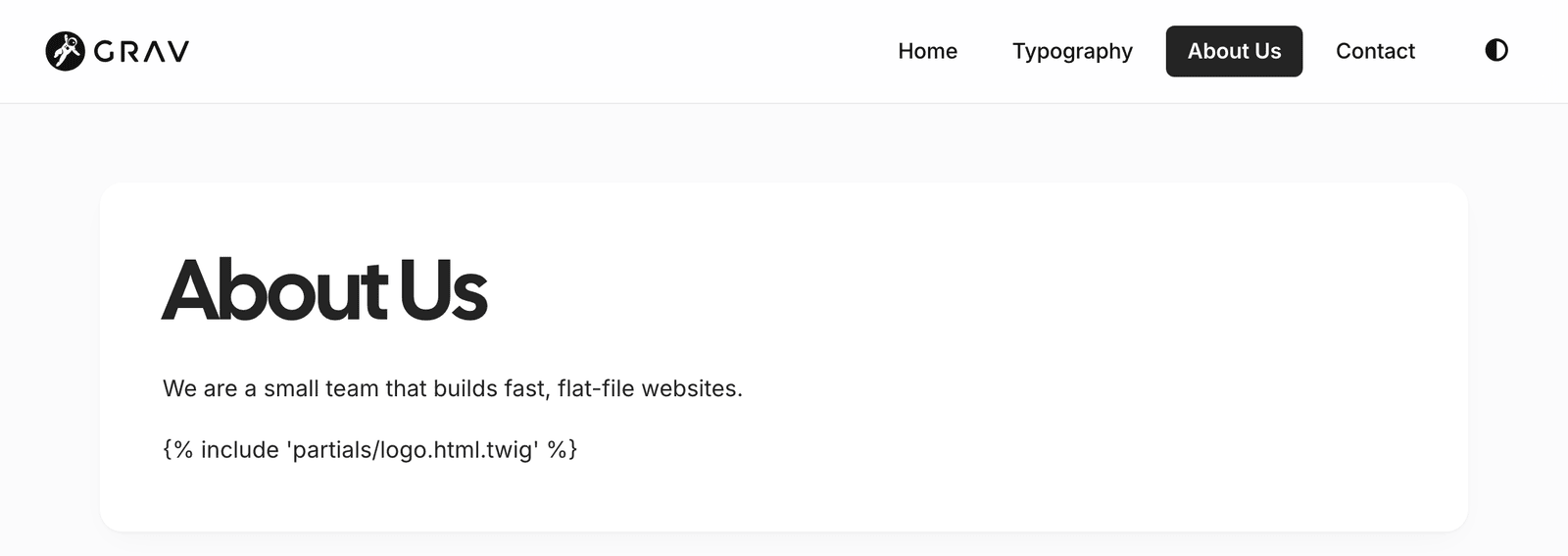
Fix it in Admin
With Admin2 2.2.6 and API 1.1.9 or later, open Tools → Reports → Twig in Content. It lists each recent block with the page it happened on and what was blocked, and offers the right fix for it:
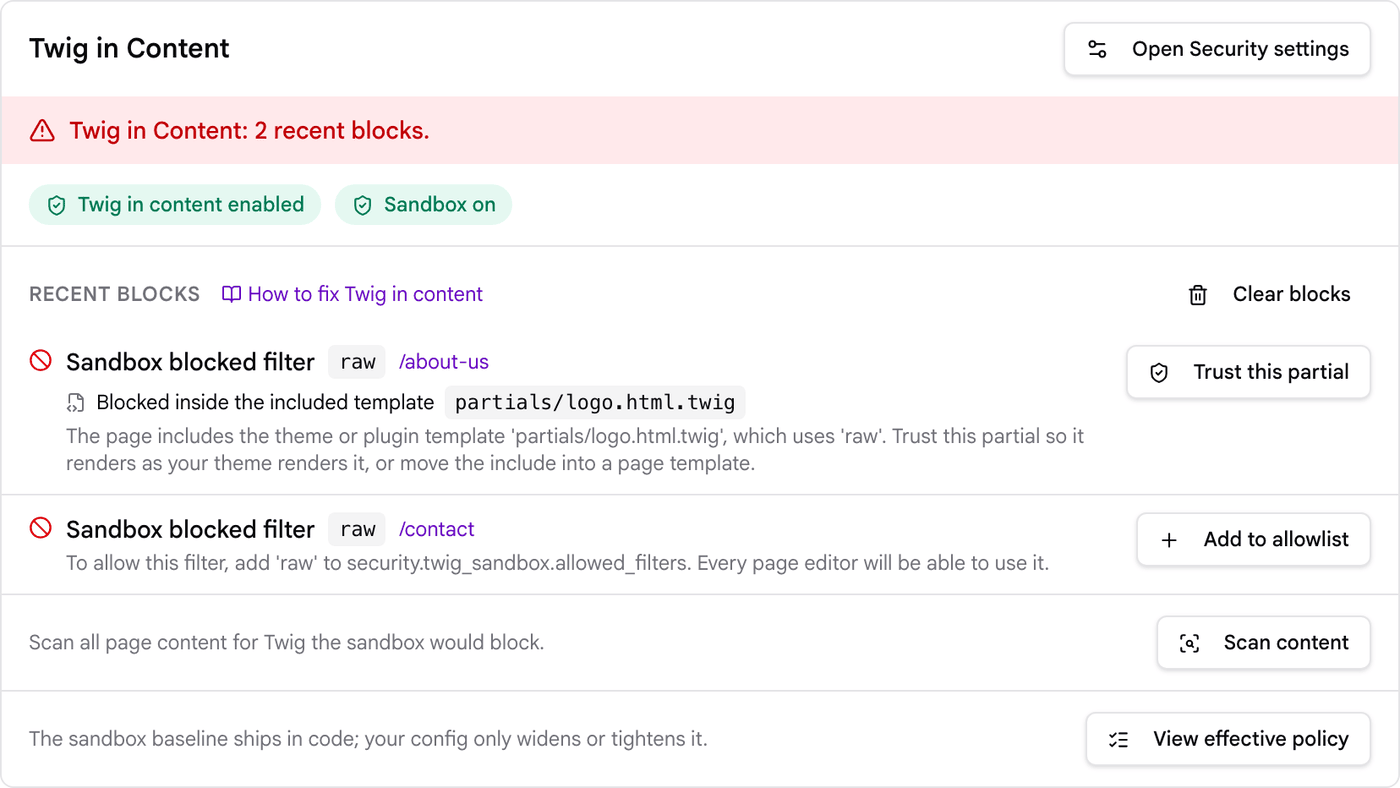
- Blocked inside the included template with a name such as
partials/teams.html.twigmeans your page includes a theme or plugin template that does something content Twig can't. This is by far the most common case after 2.2.18. Click Trust this partial, then reload the page. Before you trust a template you didn't write, read what makes a partial safe to list. - Add to allowlist means the block is in the page's own Twig. Before you click it, find what was blocked in the sections below: allowing a filter, function or method opens it to every page editor on the site, and most of them have a better fix.
After Trust this partial, the block drops out of the report and the page renders the partial the way your theme does:

The How to fix Twig in content link in the report brings you back here.
Fix it by hand
1. Find the log line. Open logs/security.log and look for the latest [TwigSandbox] line with your page's route. A line looks like this:
grav-security.WARNING: [TwigSandbox] blocked rule=filter token=raw route=/team {"rule":"filter","token":"raw","class":"","route":"/team","extra":"Filter \"raw\" is not allowed in \"partials/teams.html.twig\" at line 7.", ...}
2. Check which template it names. The extra part says where the block happened.
- If it names a theme or plugin template, such as
partials/teams.html.twig, your page includes that template and the template does something content Twig can't. See Included partials show as plain text. - If it names
@Page:followed by the page's folder, the block is in the page's own Twig. Theruleandtokenvalues tell you what was blocked. Find it in the sections below.
3. Fix it and reload. Grav picks up changes to user/config/security.yaml on the next request. If the page still shows the old output, clear the cache with bin/grav clear or the Admin's clear cache button.
To list every template that has been blocked on your site so far:
grep -o 'not allowed in \\"[^\\]*\\"' logs/security.log | grep -v '@Page:' | sort | uniq -c
To find every page that pulls in a theme or plugin template, and which templates they use, run this from your Grav root:
grep -rhoE "\{%-?[[:space:]]*(include|embed|extends|import|from|use)[[:space:]]+['\"][^'\"]+['\"]" user/pages \
  | sed -E "s/^\{%-?[[:space:]]*([a-z]+)[[:space:]]+['\"]([^'\"]+)['\"]/\1 \2/" | sort | uniq -c
Swap -rhoE for -rlE to list the page files instead. With the Twig gate on, which is the default, every page runs its Twig unless its front matter sets process.twig: false, so check them all.
Warning
The hint at the end of each log line, and the Add to allowlist button in Admin2 before 2.2.6, suggest allowing the blocked filter, function or method for all page content, even when the block happened inside an included partial. That is the wrong fix there. Allowing the raw filter, for example, lets every page editor switch off escaping anywhere on the site. Trust the partial or move the include into your theme instead, as described below.
If you are logged in as a super administrator and security.twig_sandbox.admin_hint is on, the page source also ends with <!-- Grav security: Twig sandbox blocked an expression. See logs/security.log for details. -->.
Included partials show as plain text
What you see. A page with something like {% include 'partials/teams.html.twig' %} in its content shows the include tag, and the rest of its Twig, as text. The log names the partial. Usually the partial uses the raw filter, a function from your theme or a plugin, or a variable content can't read.
Why it changed. Before 2.2.18, a theme or plugin template included from page content ran with no sandbox at all, on whatever variables the page handed it. Now it follows the same rules as the content that includes it.
How to fix it, best option first.
1. Move the include into your theme
If a page always needs the partial, put the include in a page template instead of in the content. Templates are never sandboxed. For example, add templates/team.html.twig to your theme:
{% extends 'default.html.twig' %}

{% block content %}
    {{ parent() }}
    {% include 'partials/teams.html.twig' %}
{% endblock %}
Then point the page at it in its front matter and remove the include from the content:
---
title: Our Team
template: team
---
Check the block name against your theme's default.html.twig. Quark 2 uses content. If several pages need the partial in different places, a shortcode or a front matter option that your template reads (for example show_team: true and {% if page.header.show_team %} in the template) works well too.
2. List the partial under trusted_partials
If the include has to stay in the content, trust the partial. In Admin, click Trust this partial next to the block in Tools → Reports → Twig in Content (Admin2 2.2.6 or later), which adds it to the list for you. By hand, list the partial in user/config/security.yaml:
twig_sandbox:
  trusted_partials:
    - partials/teams.html.twig
    - partials/lightbox-gallery.html.twig
A listed partial renders the way your theme renders it, with Grav's own variables (page, config, grav, theme and the rest). Your list is added to Grav's built-in entries, which cover the Form plugin's templates, so you only list your own.
How the list is matched:
- By exact name. Write each name exactly as your content writes it in the include tag. There are no wildcards or folder matches. When the name is built in Twig, for example
'partials/' ~ type ~ '.html.twig', the final name is what gets checked. - For
{% include %}only.{% embed %},{% extends %},{% import %},{% from %}and{% use %}of a listed template still run under the sandbox. Theinclude()function is never allowed in content. - Only the partials your content includes directly. Templates that a listed partial includes, imports or extends itself run normally, so you don't need to list them.
- Whichever file Grav finds under that name. If your theme and a plugin both have
partials/teams.html.twig, your theme's copy is the one used, as usual.
What content can pass to a listed partial:
- Plain values only: text, numbers, true/false and lists of them, passed with
with { ... }or set earlier in the content with{% set %}. For example{% include 'partials/alert.html.twig' with {message: 'Closed Monday'} %}. - Never an object.
{% include 'partials/card.html.twig' with {item: page} %}blocks the page, and the log saysOnly plain values can be passed to the trusted partial "partials/card.html.twig" ("item" is not one). Pass a route or other plain value instead, or move the include into a template. - Never a name Grav already sets. A value passed as
page,form,configorgravis ignored, and the partial gets Grav's own.
The Security page in Admin has no field for this list, so use the report or edit the file. Saving the Security page keeps the list as it is.
Warning
Only list a partial you'd be happy to run with your theme's full powers. Anyone who can edit a page can include it with values of their choosing, so it should print every value it's given with escaping ({{ message }}, never {{ message|raw }}), and it should not use those values to read things content can't read itself, such as config keys, files or accounts.
3. Make the partial work under the sandbox
If the partial only needs things content may use anyway, change it so it runs under the sandbox and needs no setting at all. Drop |raw from values that don't need it, read site and theme instead of config (which is empty in content), and stick to the tags, filters and functions listed in Twig in Content. Partials like Quark 2's partials/logo.html.twig that print an SVG with |raw can't run this way, so use option 1 or 2 for those.
embed, extends and import of theme templates
What you see. Content that uses {% embed %}, {% extends %}, {% import %}, {% from %} or {% use %} with a theme or plugin template shows as plain text when that template does something content can't. The log names the template.
Why it changed. Same change as above: these templates now run under the sandbox, and trusted_partials doesn't apply to them.
How to fix it. Move the code into a page template (option 1 above). Or switch to a plain {% include %} of a listed partial and pass plain values instead of overriding blocks. Or change the template so it runs under the sandbox.
page.path and page.filepath are blocked
What you see. {{ page.path }} or {{ page.filepath }} shows as plain text. The log line reads rule=property token=path (or token=filepath) with the class Grav\Common\Page\Page.
Why it changed. Like many page methods, these also change the page when given an argument, and the sandbox can only check the name of a call, not its arguments.
How to fix it. Use what you actually need: page.route or page.url for links, and page.media for files in the page's folder. If you really need the folder on disk, do it in a theme template. As a last resort you can allow them again, which undoes this fix for your site:
twig_sandbox:
  allowed_methods:
    - class: 'Grav\Common\Page\Interfaces\PageInterface'
      methods: 'path, filepath'
{% autoescape %} is blocked
What you see. A page using {% autoescape false %} (or any autoescape block) shows as plain text. The log line reads rule=tag token=autoescape.
Why it changed. autoescape false switches off escaping for everything inside it, which is what the raw filter does, and content can't use raw either.
How to fix it. Write the HTML directly in the page, since Markdown passes HTML through as it is, or move the block into a theme template. Adding autoescape to allowed_tags works, but it gives every page editor a way around escaping.
Account fields other than name, email and language
What you see. Twig that reads an account field such as title, avatar or a custom field shows as plain text. The log reads rule=property token=title with the class Grav\Common\User\User, or rule=method token=get for .get('field'). Content has no user variable by default, so this only affects sites that gave content access to an account, for example by allowing grav.user, or plugins that pass accounts to content Twig.
Why it changed. An account object also holds its password hash, two-factor secret and reset tokens. Content Twig can now read only username, fullname, email, language, authenticated and authorized, and call authorize().
How to fix it. Name the extra fields you want content to read, and read them with dot syntax ({{ account.title }}):
twig_sandbox:
  allowed_properties:
    - class: 'Grav\Common\User\Interfaces\UserInterface'
      methods: 'title, avatar'
The key is methods: in property rows too. The getters that take a field name (get, value, getProperty and account['field']) can't be allowed again, so change account.get('title') to account.title. Never list a field that holds a secret.
Settings come back empty
What you see. No plain text, but a value that used to print is now empty. This only affects sites that list extra paths under security.twig_sandbox.config_denied_paths.
Why it changed. A setting hidden from content now stays hidden however content reaches it: through theme_var(), header_var() or body_class(), by looping over a config tree, through plugin page settings, or as theme.x instead of themes.<your-theme>.x. Before, some of those routes still returned it.
How to fix it. If the value isn't secret, take it out of your config_denied_paths, or move it to a setting that isn't hidden. The built-in paths (plugins, streams, security, backups, scheduler and a few passwords) always stay hidden. Otherwise read the value in a theme template.
Two related points that trip people up. The config variable is empty in content unless Allow config variable access in Twig is on under Configuration → Security (security.twig_content.config_access: true). And even with it on, read values with config.get('site.title'), or use the site and theme variables, because config.site.title is blocked.
array_key_value() and sort_by_key
What you see. sort_by_key on a list of objects shows the page as plain text, with rule=property and the key you sorted by in the log. array_key_value() given an object instead of an array returns a new one-item array and leaves the object alone.
Why it changed. Both read or write a key on every item they are given, and on objects that happened outside the sandbox's checks.
How to fix it. Sort with the sort filter and an arrow function, which only calls methods content is allowed to call:
{% for p in items|sort((a, b) => a.title <=> b.title) %}
    {{ p.title }}
{% endfor %}
Build arrays with merge instead of array_key_value(): {% set list = list|merge({(key): value}) %}. Lists of plain values, such as lists from front matter, work with both as before.
Image text from media metadata shows Twig as text
What you see. Twig written in a media file's .meta.yaml (alt text, title, caption) or in its file name no longer runs when the file is used in a Markdown image. An alt text of Photo of {{ page.title }} now reads exactly that.
Why it changed. That text comes from files on disk, not from the person writing the page, so Grav always treats it as text. For the same reason, a .meta.yaml file can no longer change which file a medium points to.
How to fix it. Put the Twig in the page itself, , which works as before, and keep plain text in the metadata.
Forms in page front matter read empty config values
What you see. A form defined in a page's front matter has a field that uses config-default@ (or another config-*@ directive) and now starts empty. There's no log line.
Why it changed. Forms in page front matter are written by page editors, so they now read config the same way content Twig does. With security.twig_content.config_access off, the default, they can only read system.*, site.* and theme.*, minus anything hidden by config_denied_paths.
How to fix it. Move the value into user/config/site.yaml and point the field at it:
config-default@: site.greeting
Or turn on Allow config variable access in Twig under Configuration → Security (security.twig_content.config_access: true). Then other config files can be read too, but plugins.* and the other hidden paths still can't.
The Form plugin's own templates are trusted by default, so {% include 'forms/form.html.twig' %} in a page's content keeps working.
Stream links and images return nothing
What you see. {{ url('user://data/files/report.pdf') }} in content prints nothing. A Markdown image or media_directory() call that uses a stream outside the media folders shows nothing either.
Why it changed. In content, streams only resolve inside the media folders listed under security.media.allowed_roots: page://, image://, media://, theme://, themes://, plugins://, asset://, system://images and system://assets. url() follows this rule since 2.2.18. Images and media_directory() have since 2.2.13.
How to fix it. Move the file into the page's own folder, user/images (image://) or user/media (media://). You can also add a folder to the list, but write out the full list, since your list replaces the default:
media:
  allowed_roots:
    - page://
    - image://
    - media://
    - theme://
    - themes://
    - plugins://
    - asset://
    - system://images
    - system://assets
    - user://downloads
Your web server rules may still block the folder. user/data, for example, is not served to browsers.
HTML next to Twig is escaped with escape_markup
What you see. On a site or page with Markdown's escape_markup option on, a line that mixes HTML and Twig, such as <div class="note">{{ page.title }}</div>, shows its HTML tags as text. The Twig still runs.
Why it changed. Such lines used to skip the escaping that escape_markup applies to every other line of HTML.
How to fix it. Turn escape_markup off for that page (markdown: { escape_markup: false } in its front matter), or move the markup into a theme template.
Other changes you might notice
- Email settings in front matter. A form's email body, subject and recipients in page front matter follow the same rules as page content. A custom template they include needs to be listed under
trusted_partialstoo. - The
string()function (since 2.2.16) runs the same checks as the|stringfilter, so turning an object into text needs__tostringallowed for that class. The log readsrule=method token=__tostring. yaml_decodealways reads invalid YAML as text, never as a file name.
For theme and plugin developers
Templates that page content includes, embeds or extends now run under the content sandbox, with whatever values the page passes in. If people include your templates from their pages, you have three ways to keep them working.
Make the template run under the sandbox. Only use the tags, filters, functions and methods the sandbox allows. Don't use |raw or autoescape. Escape every value you're given. Don't read config, which is empty in content; use site, theme and the values passed in. If the template calls your plugin's own Twig functions, and they are safe for any page editor to call, register them with the onBuildTwigSandboxPolicy event as shown in the Developer Upgrade Guide. Test it by including the template from a page and checking logs/security.log.
Give authors something other than an include. A shortcode, a page template they can pick with template:, a modular template, or a front matter option your page template reads all keep your Twig in trusted templates, where it belongs. For most plugins this is the better answer.
Document it for trusted_partials. If the template really has to be included from content and can't run under the sandbox, tell site owners its exact name and that they can add it to security.twig_sandbox.trusted_partials. Before you do, make sure it's safe to list: it prints every value escaped, it treats the values it's given as plain text and numbers (it never gets objects from content), and it doesn't use them to read config, files or accounts. A listed template gets Grav's real page, config and grav, so whoever edits a page decides only what plain values it sees. Leave adding it to the list to the site owner: don't change the setting from your plugin's code.